What you see on screen, how to install it, and how to tell real from fake
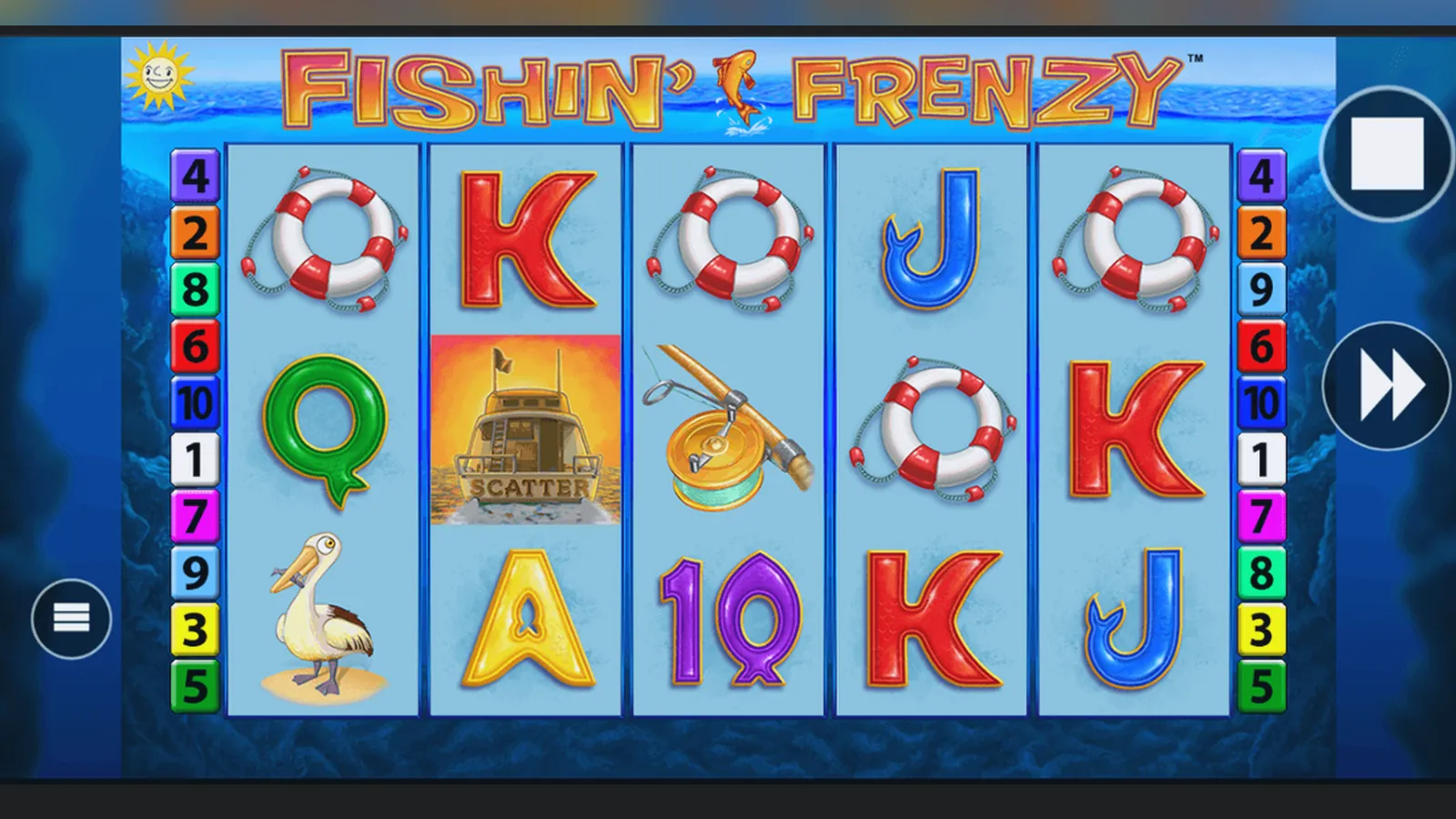
Fishin Frenzy runs in your browser, through operator apps, or as a web-app shortcut on your home screen — no separate store download required. The game itself is the same Blueprint Gaming slot you'll find on any UKGC-licensed site; what changes is the wrapper and whose name sits in the footer.
This page walks through the interface you'll actually see, the install routes that exist (and the risks of each), the specs your phone needs, and the red flags that mark a fake clone. If you're checking whether a site or APK is legitimate, start with the UKGC register and the permissions list.
Store-style card: what the listing would say
Fishin Frenzy isn't distributed as a standalone app, but if it were treated like one, here's the profile you'd see. These numbers reflect the slot as embedded in operator platforms across the UK market.
The version number comes from Blueprint's build; operators integrate it into their own lobby systems. That's why the same game can look slightly different site to site — the UI chrome, menu placement and footer belong to the operator, not the slot.
Five screens, described in words
- Lobby tile: the game card in the casino's slot grid, showing the Fishin Frenzy logo, a thumbnail of the angler on the jetty, and a «Play» or «Demo» button. Some sites badge it «Blueprint» or «Popular»; others surface RTP if you tap the info icon.
- Launch splash: a full-screen load screen with the game logo, a progress bar, and the provider lockup at the bottom. This screen also carries the RTP declaration (usually 96.00%, but check the rules overlay) and the game ID. It lasts 2–4 seconds on a decent connection.
- Main reel view: the 5×3 grid fills the middle third of the screen, with the stake selector bottom-left (£0.10–£5.00, or £0.10–£2.00 if you're 18–24), spin button bottom-right, balance top-left, and win display top-centre. The autoplay and turbo toggles sit in a second-row menu below the reels. The background is the jetty scene; the frame is minimal so the symbols stay visible.
- Free Spins overlay: when you land three or more scatter fishermen, the screen dims and a pop-up announces the feature — number of spins awarded, the active multiplier (if any fish are caught), and a «Start» button. The overlay uses the same palette as the base game but with a brighter accent on the text.
- Paytable and rules: accessed via the hamburger or «i» icon, this multi-page modal lists symbol values (in your stake's currency, so £0.50 stake shows wins in pounds, not coins), explains the Free Spins mechanic, shows RTP and volatility, and links to the operator's responsible-gambling tools. The UKGC licence number usually appears in this overlay or the main footer.
These five views cover 95% of your session. The settings panel (sound, quick-spin, history) is a sixth screen, but most players leave it default.
Install paths, step by step, and the risk of each
There are four ways to get Fishin Frenzy on your phone. The first two are browser-based and carry almost no risk if you start from a UKGC-licensed site. The last two involve downloads and need more care.
- Open Safari (iOS) or Chrome (Android).
- Navigate to a licensed operator — check the UKGC register and match the footer licence number before you deposit.
- Log in (or play demo if the site allows logged-out free play; many now require age verification even for demo).
- Find Fishin Frenzy in the slots lobby and tap «Play».
- The game loads in the browser window; HTML5 means no plugin required.
Risk: near zero, assuming the site itself is legitimate. Your browser sandboxes the game; it can't access your photos, contacts or location unless you grant permission (and Blueprint's slot doesn't ask).
- Load the game in your browser as above.
- On iOS: tap the Share icon, scroll down, choose «Add to Home Screen», name it, tap «Add». On Android: tap the three-dot menu, «Add to Home screen», confirm.
- An icon appears on your home screen; tapping it launches the game full-screen, without the browser chrome.
Risk: still minimal. This is a bookmark, not a native app; the game still runs in the browser engine and inherits the same sandboxing. The only new attack surface is the icon itself — if you add a shortcut to a phishing site, you've now got a persistent reminder to revisit it.
- Search the App Store (iOS) or Google Play (Android) for the operator's name — not «Fishin Frenzy», which won't have its own listing.
- Check the developer field matches the operator, read reviews, and confirm the UKGC licence in the app description or on the operator's website.
- Install the app, open it, register or log in.
- Navigate to the slots section and launch Fishin Frenzy from within the app's web-view or embedded game client.
Risk: low if you verify the developer. The app will request permissions (camera for ID upload, notifications for promotions, possibly location to comply with geo-blocking). These are standard for a gambling app. Reject any permission that seems unrelated — access to contacts, calendar, or microphone when you're not using live support.
- A site offers an APK file for direct download, bypassing Google Play.
- You enable «Install unknown apps» in Android settings.
- You download and install the APK.
- The app requests permissions and, if it's malicious, may ask for things no slot needs: SMS, call logs, device admin.
Risk: high. APKs from unlicensed sites are the primary vector for clones that steal credentials or payment details. Even if the app looks like Fishin Frenzy inside, the wrapper can log everything you type. If you're outside the Play Store, you're outside Google's malware scanning. The UKGC does not licence operators who distribute sideloaded APKs as the main channel; legitimate UK sites use Play Store apps or browser play.
In short: browser or official app store only. If someone offers you an APK, treat it as hostile until you've verified the operator's UKGC status and confirmed they actually publish that file.
Phone requirements and what the app actually does
Fishin Frenzy is built in HTML5, so the spec floor is low. You need a phone released in the last five years, a browser that's kept up to date, and a stable connection — 3 Mbps is plenty once the initial assets load.
- Operating system: iOS 13 or later, Android 8.0 (Oreo) or later. Older devices may load the game but suffer frame drops during the Free Spins reel-set swap.
- RAM: 2 GB minimum, 3 GB comfortable. The game itself is light, but if you have a dozen browser tabs open behind it, the OS may kill the session to reclaim memory.
- Screen: any resolution from 720p up. The game scales to fit portrait or landscape; most players prefer landscape for the reel layout, but portrait works fine for casual spins.
- Storage: 45 MB cached in the browser or app. This is the sum of the reel strips, symbol atlases, sound files and UI assets. Clear your cache and the game will re-download them on the next launch.
- Network: Wi-Fi or 4G. The game pings the server every spin to fetch the result and update your balance; latency above 200 ms makes the experience feel sluggish, but the outcome is already determined server-side so a slow connection won't change your odds.
What the app does: it displays the reels, animates the symbols, plays sound, and sends your stake and spin command to the operator's game server. The server runs the RNG, determines the result, deducts your stake, credits any win, and sends back a payload that tells the client which symbols to show. Your phone is a remote control and a screen; the actual gambling happens in a data centre that the UKGC's testing labs have audited.
What it doesn't do: it doesn't store your payment details (those live in the operator's account system, behind PCI-DSS encryption), it doesn't need location services unless the operator is geo-fencing to exclude self-excluded regions, and it doesn't access your contacts, photos, or calendar. If a «Fishin Frenzy» app asks for any of those, it's not the real game.
Version updates, clones and permission red flags
Blueprint pushes updates every few months — bug fixes, tweaks to the paytable display, occasional art refresh. The October 2026 build (3.1.8) added a persistent balance ticker in the top bar and smoothed the transition into Free Spins; earlier versions had a half-second black screen. You won't notice most updates unless you play daily.
Version mismatches: if you load the game on two different operators and see different version numbers, that's normal — some sites integrate updates faster than others. The RNG and paytable are identical; only the client-side polish differs.
- The site has no UKGC licence number in the footer, or the number doesn't match an entry in the public register. This is the fastest tell; unlicensed sites are illegal to serve UK players and you have no recourse if they refuse to pay.
- The download comes from a third-party file host or an APK link, not the Play Store or App Store. Legitimate operators don't ask you to sideload.
- The app requests permissions that a slot game has no business needing: reading SMS (used by malware to intercept two-factor codes), accessing call logs, managing device admin (which prevents you uninstalling it), or reading contacts.
- The paytable or rules screen shows dollar amounts when you're in the UK, or the RTP is absent. Clones often copy the art but forget to localise the text.
- The branding is slightly off — «Fishing Frenzy» with a G, or «Fishin Frenzy Deluxe» when you wanted the original. Some clones use similar names to ride Blueprint's SEO; check the developer field.
- The site promises guaranteed wins, RNG hacks, or «inside strategies». The RNG is certified by third-party labs; no app can override it, and anyone claiming otherwise is selling snake oil or a scam.
If you've already installed an app and you're now suspicious, check what permissions it holds (Settings → Apps → [app name] → Permissions on Android; Settings → [app name] on iOS). Revoke anything that looks excessive, or uninstall outright. For browser play, clear your cache and run a malware scan if you entered payment details on an unlicensed site; then contact your bank.
The safest route remains the official operator app from the store, or browser play on a site whose licence number you've verified. Fishin Frenzy is popular enough that scammers clone it; five minutes of checking now beats hours of dispute later.
FAQ
Do I need to download anything to play Fishin Frenzy on my phone?
No. The game runs in Safari or Chrome via HTML5; just navigate to a UKGC-licensed operator, log in, and launch it from the slots lobby. You can add a home-screen shortcut for quicker access, but that's still browser-based — no separate install required. Some operators offer native apps in the Play Store or App Store; the game embeds inside those, but the app itself is optional.
What's the difference between the browser version and an operator's app?
The slot is identical; Blueprint's RNG, reel strips and paytable are the same either way. The difference is the wrapper: browser play shows the game in a browser tab with the URL bar visible (unless you use a home-screen shortcut), while the operator's app puts it in a dedicated interface with a native menu and push notifications for bonuses. Performance is comparable on a modern phone; pick whichever UI you prefer.
I found an APK download for Fishin Frenzy — is it safe?
Probably not. Legitimate UK operators distribute apps through the Play Store or App Store, where Google and Apple vet them for malware. An APK from a third-party site bypasses that vetting and often asks for permissions (SMS, contacts, device admin) that a slot has no reason to need. Check the UKGC register for the operator's licence number; if they're not listed, the APK is either a clone or a front for an unlicensed site. When in doubt, stick to browser play or the official store app.
Why does the game ask for my location or camera?
Location is sometimes used by the operator to enforce geo-blocks (if you're self-excluded via GAMSTOP, or if they detect VPN use). Camera access is for uploading ID during KYC verification before your first withdrawal — age and identity checks are mandatory under UKGC rules. The game itself doesn't request these; the operator's app or account system does. You can deny location if you're playing from home in the UK, but you'll need to allow camera temporarily when you submit documents. Any request for contacts, call logs, or SMS is a red flag and should be declined.